AppSumo Radar beta
Radar products are early-stage listings that are managed by the team who built the product.Learn more about Radar

See which app is slowing your Mac

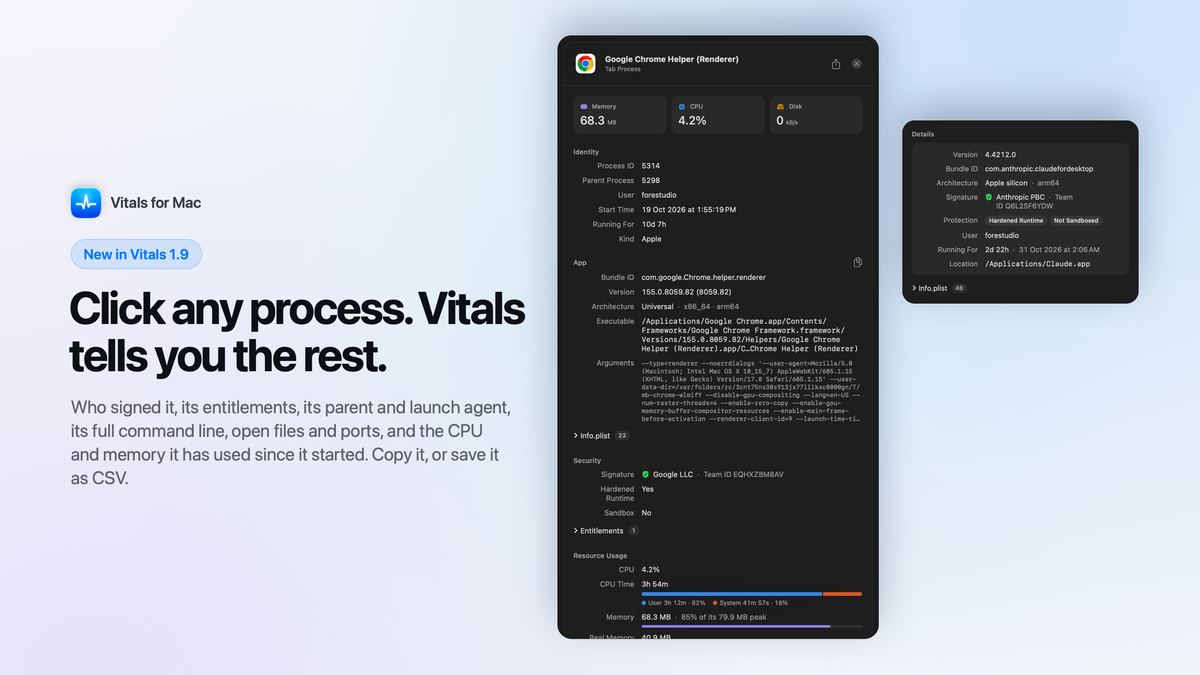
The Vitals process drawer for a Chrome tab process: its parent, version, command line, Google's signature and the CPU and memory it has used, beside the Details card for the Claude app
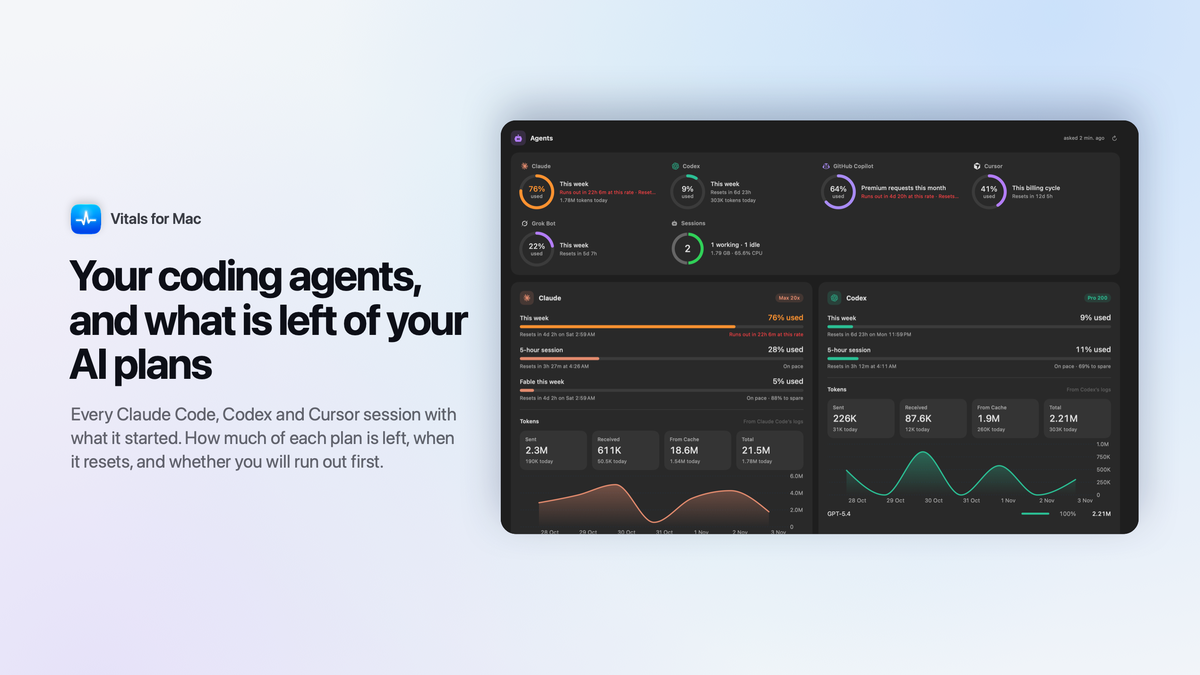
The Vitals Agents tab: how much of the Claude, Codex, GitHub Copilot, Cursor and Grok plans is used, two coding sessions, and the tokens Claude Code and Codex used this week
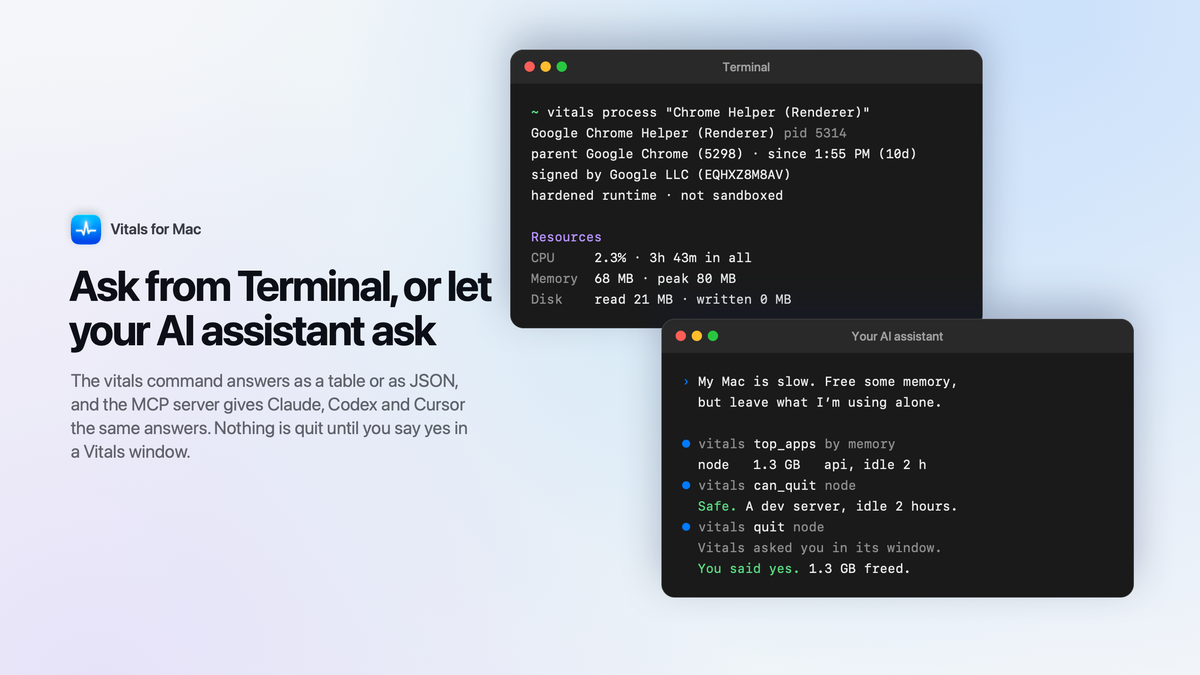
Two terminal windows: the vitals process command describing a Chrome helper, and an AI assistant using Vitals over MCP to find an idle dev server and quit it once the person said yes
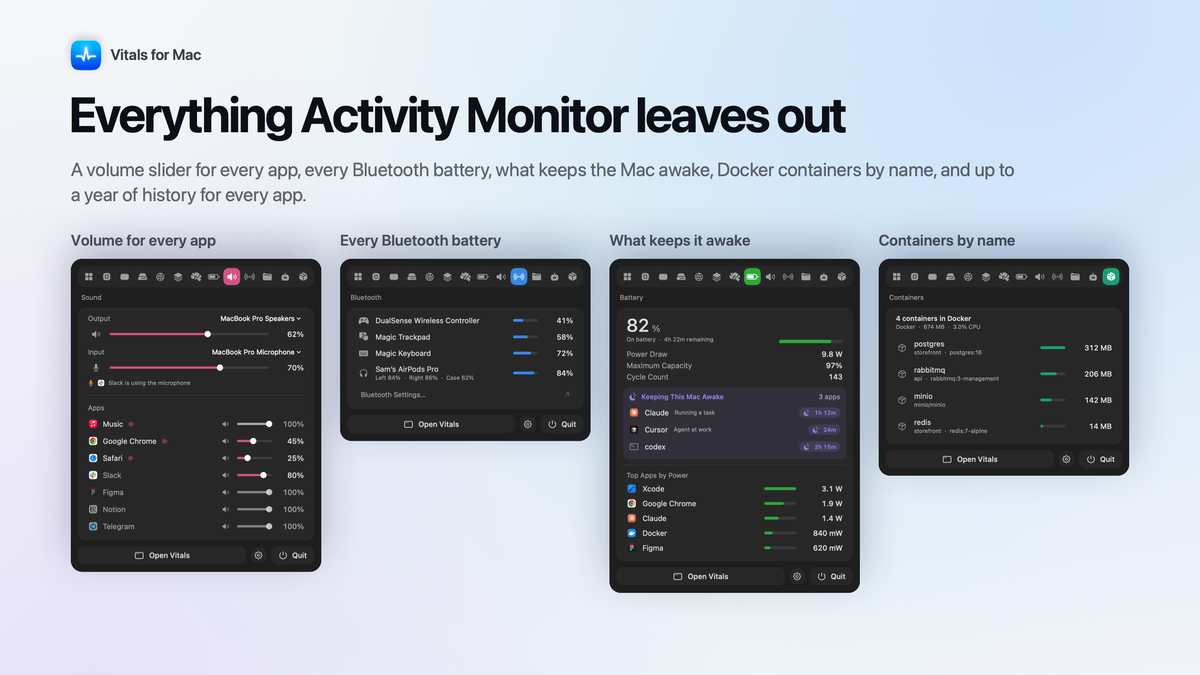
Four Vitals dropdown tabs side by side: a volume slider per app, Bluetooth batteries, what keeps the Mac awake, and Docker containers

Vitals for Mac

-62%$15
$39
  • Lifetime access
  • Refundable up to 60 days
No "We Got Your Back" guarantee. Radar is a discovery engine — we don't vet these products, so this guarantee doesn't apply.
AppSumo's 60-day refund applies to most deals. AI skills are non-refundable once redeemed.
AppSumo Labs

Early-stage product. Brought to you by the team who built it.

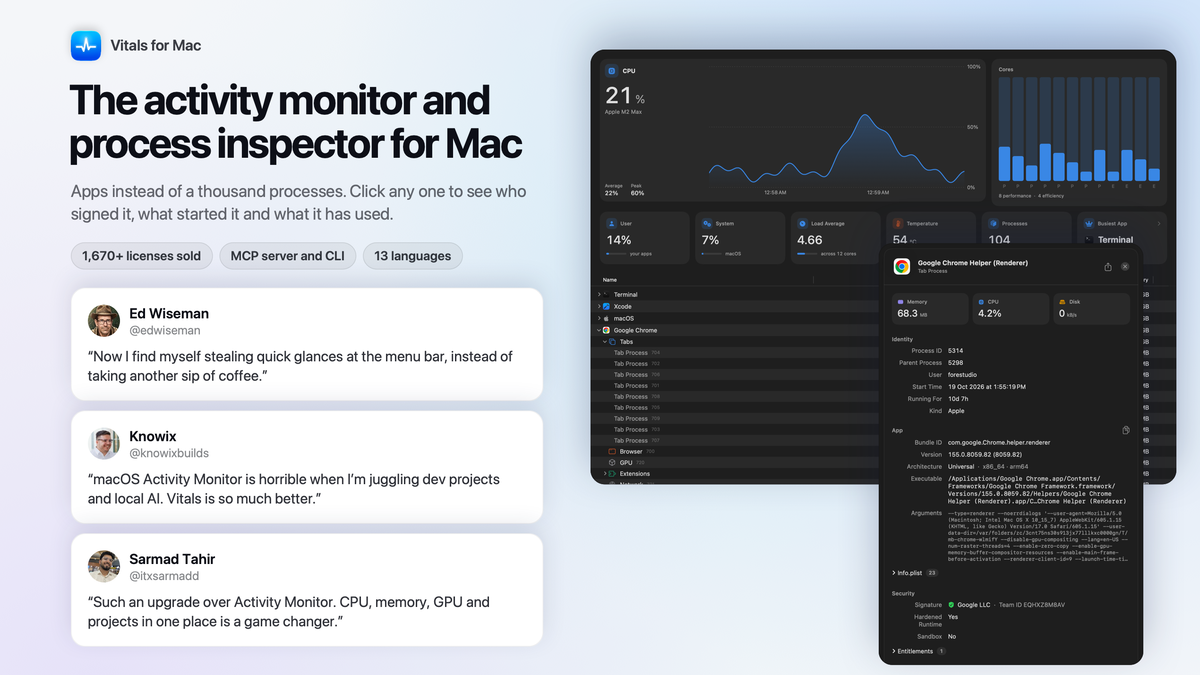
Activity Monitor lists a thousand processes. Vitals groups them into apps, lets you click any process to see who signed it, what started it and what it used, and answers your AI tools over MCP.

TL;DR

  • checkmarkFind the app behind a hot, slow Mac, then click any process to see who signed it, what started it and what it used
  • checkmarkWatch your coding agents and AI plan limits, and let Claude, Codex or Cursor ask Vitals over MCP or in Terminal

At-a-glance

vitalsmac.com

Alternative to

Datadog

Integrations

ChatGPT, MCP, Cursor, Claude Code, ChatGPT Codex

Best for

Developers, Freelancers, Solopreneurs

Why people switch from Activity Monitor

Click any process and see who signed it, what started it, and what it has used

  • See what a process really is: its app, version, bundle ID, architecture, code signature and Team ID, hardened runtime, sandbox and entitlements
  • Follow it up and down the tree: its parent process and launch agent, its full command line and environment, its open files, listening ports and child processes, one click each
  • Read its whole life, not just this second: CPU time since it started, split into user and system, memory against its peak, threads and bytes read and written, with a live chart
  • Catch what just crashed: a process that started seconds ago is marked New, and Ended Recently keeps what stopped in the last ten minutes
  • Copy it for a bug report or save it as a CSV file, with the Info.plist, entitlements and environment included
Click any process and see who signed it, what started it, and what it has used

Keep an eye on your coding agents and what is left of your AI plans

  • See every coding agent at work: Claude Code, Codex, Gemini CLI and the rest, with the project, whether it is working or waiting for you, and everything it started
  • Quit a session and everything it started, from the dev server to the tests, in one go
  • Know when a plan runs out: what is left of Claude, Codex, GitHub Copilot, Cursor, Antigravity, Grok, Ollama and OpenCode, when each limit resets, and whether you are on pace
  • Count the tokens Claude Code and Codex used today and this week, and which models took them
  • Put a plan in the menu bar so the week's limit is always one glance away
Keep an eye on your coding agents and what is left of your AI plans

Ask from Terminal, or let your AI assistant ask Vitals first

  • Use the vitals command for everything Vitals sees: apps, ports, dev servers, agents, AI plans and up to a year of history, as a table or as JSON
  • Find the app behind a spike with vitals top --at 14:02, and inspect any process with vitals process
  • Connect Claude, Claude Code, Codex and Cursor through the MCP server, so they ask what is running before they guess
  • Stay in charge of quitting: an assistant cannot quit anything on its own; Vitals asks you in its own window and refuses what should be left alone
  • Choose what assistants may see: system figures, apps, projects or history, and install it all with Homebrew
Ask from Terminal, or let your AI assistant ask Vitals first

See the app behind the number, not a hundred helpers

  • Find the culprit at a glance: every helper is added to the app that launched it, so a busy Mac shows about 60 apps, each with one figure for memory, CPU, energy, disk and network
  • Open Chrome, Safari, Firefox, Edge, Brave or Arc to see which tabs, extensions and graphics work are behind its memory and CPU
  • Look back over up to a year to find the app that drained the battery overnight, with the peaks marked and every day exportable as CSV
  • Get a notification when an app misbehaves, or set a memory or CPU limit of your own for one app
  • Quit or force quit an app or a single process in two clicks, always after a confirmation
See the app behind the number, not a hundred helpers

Get everything Activity Monitor leaves out

  • Turn Chrome down while Music stays up with a volume slider for every app that has sound open
  • See every Bluetooth battery in one list, lowest first, with AirPods split into left, right and case
  • Find what keeps your Mac awake and which apps draw the most power, so the battery lasts the meeting
  • Catch the dev servers you forgot were running, grouped by project with their ports, and stop an idle one in one click
  • Watch Docker, OrbStack, Podman and Colima containers by name, with the memory and CPU each one takes
  • Read it in your own language: 13 languages, in the words macOS uses
Get everything Activity Monitor leaves out

Choose the plan that’s right for you

Feel secure in your purchase with AppSumo's 60 day money-back guarantee.

Refundable up to 60 daysNot covered by We Got Your Back. Why?
Deal terms & conditions
Vitals for Mac
See Vitals for Mac
Founded September 24, 2026
🇵🇰Pakistan
1-10
Startup
Bootstrapped

See which app is slowing your Mac

Hey Sumo-lings 👋

I'm Atta, an indie Mac developer and the solo builder behind Vitals.

I kept running into the same problem: my Mac got hot and slow, and nothing told me which app was causing it.

Activity Monitor showed me 1,041 processes, 96 of them called Google Chrome Helper, and left me adding them up. Menu bar monitors showed me a busy CPU, but not who was behind it. Vitals is a native Mac app that counts every helper under the app that launched it, so you see about 60 apps, each with one figure for memory, CPU, energy, disk, and network.

Then I kept going, and Vitals became a process inspector too. Click any process and it tells you who signed it, what started it, its full command line, and what it has used since it started. Activity Monitor gives you a name and a number.

Since launch, Vitals has also learned to watch your coding agents and what is left of your Claude, Codex, Copilot and Cursor plans. It has a vitals command for Terminal and an MCP server, so Claude, Codex, and Cursor can ask Vitals what is running before they guess. An assistant cannot quit anything on its own: Vitals asks you first, in its own window. History now goes back up to a year, and Vitals speaks 13 languages. Nothing about what you run leaves your Mac.

I posted it on X on 24 September 2026, and it took off: 120,000 views, the first 1,000 licenses gone inside a week, and more than 1,670 sold so far. I've shipped 60 updates in six weeks, most of them things buyers asked for, and every one was free.

I'm on AppSumo because I'm building Vitals for the long run, and this is the community I want building it with me. Every update from here is free for life too.

I'll be in the questions section throughout the campaign, so ask me anything 🙌

Atta Ur Rehman Shah
Founder, Vitals 

What “Radar” means for this product

Learn more about AppSumo deals

Radar is home to early-stage products looking to gain traction. Here’s the lowdown of what these deals are and aren’t.

Where it is in its life

Radar products are at the start of their journey. They're fresh on the scene and building a customer base.

How we vouch for it

We've verified the basics and reviewed the listing for safety. Success isn't guaranteed — we haven't fully vetted every claim, feature, or result.

Code & security review

All AI skills are reviewed for security purposes. We do not review software code — partner owns security and what ships.

Refund policy

60-day refund on most deals. AI skills are non-refundable once redeemed.

Pricing

Prices are set by the founder. Simple as that.

Where you'll see it

The Radar section of our site exclusively. These products are in early discovery and not quite ready for the AppSumo limelight yet.

Radar is a discovery engine — because we aren’t vetting these products, our We Got Your Back guarantee doesn’t apply. Should these products show traction, our team will work with theirs to get them ready for the main stage (and protected).

Questions & reviews